Welcome to DreamsPlus

Artificial Intelligence

The Science of Training AI Models: Tips for IT Engineers

The Science of Training AI Models: Tips for IT Engineers Artificial Intelligence (AI) is a transformative force in technology, and for IT engineers, the ability to train AI models effectively is a critical skill. The process of training an AI model involves much more than simply feeding data into an algorithm. It requires a deep understanding of data, machine learning (ML) techniques, and continuous model improvement. This blog explores the science behind training AI models and offers practical tips to help IT engineers build more accurate and efficient AI systems. 1. Understanding the AI Training Process Training an AI model is a structured process that starts with defining the problem and ends with deploying a model that can make accurate predictions or decisions. Let’s break down the key stages involved. Problem Definition Before starting the training process, clearly define the problem you want to solve with AI. Are you working on a classification problem, such as recognizing images or detecting fraud? Or are you building a recommendation system? Data Collection and Preprocessing The success of an AI model hinges on the quality of the data used for training. Collect relevant, high-quality data and preprocess it to ensure it’s clean and structured for use. This includes: Data Cleaning: Remove duplicates, missing values, and irrelevant information. Feature Engineering: Identify the most important features that will help your model make predictions. Normalization: Scale features to a standard range, especially important for distance-based algorithms like k-nearest neighbors. Model Selection Choosing the right model is a critical step. You need to select a model that aligns with your problem type and the nature of the data. Popular model types include: Supervised Learning: Used for labeled data, including regression and classification. Unsupervised Learning: Used for data without labels, such as clustering and dimensionality reduction. Reinforcement Learning: Involves training agents to make decisions based on rewards. 2. Tips for Optimizing the Training Process Training AI models is resource-intensive and can take time, especially with large datasets and complex models. Here are some strategies to optimize the training process: Data Augmentation For limited datasets, data augmentation can help improve the model’s ability to generalize. Techniques like rotating images, changing color schemes, or introducing noise can effectively increase the variety of data available for training. Regularization Techniques Regularization helps prevent overfitting by penalizing the model for becoming too complex. Common regularization techniques include: L2 Regularization: Adds a penalty proportional to the sum of squared weights. Dropout: Randomly deactivates some neurons during training to prevent overfitting. Hyperparameter Tuning AI models come with a range of hyperparameters that influence their performance, such as learning rate, batch size, and number of hidden layers in a neural network. Perform hyperparameter tuning using techniques like: Grid Search: Exhaustively tries all combinations of hyperparameters. Random Search: Randomly samples hyperparameters for faster results. Bayesian Optimization: Uses a probabilistic model to suggest promising hyperparameter values. Cross-Validation Cross-validation helps evaluate a model’s performance and prevents overfitting. The most common technique is k-fold cross-validation, where the data is divided into k subsets, and the model is trained k times, each time using a different subset as the validation set. 3. Leveraging Machine Learning Frameworks and Libraries Machine learning frameworks and libraries simplify the process of building and training AI models. Popular tools that IT engineers should become proficient with include: TensorFlow and Keras TensorFlow, developed by Google, is one of the most widely used deep learning frameworks. Keras, now part of TensorFlow, provides a simpler interface for building neural networks. Both are highly scalable and well-suited for large-scale AI projects. PyTorch Another popular framework, PyTorch is known for its flexibility and dynamic computation graphs, making it especially useful for research and experimentation. PyTorch is increasingly used in both academia and industry for AI model training. Scikit-Learn Scikit-learn is a powerful library for classical machine learning algorithms. It provides easy-to-use implementations of various models for classification, regression, clustering, and dimensionality reduction. Scikit-learn is ideal for small to medium-sized datasets. XGBoost For structured data, XGBoost is a highly efficient implementation of gradient boosting. It is particularly effective for tasks like classification and regression, and it is widely used in data science competitions. 4. Evaluating Model Performance After training a model, evaluating its performance is crucial to ensure that it’s capable of solving the problem at hand. Here are some key performance metrics and techniques for evaluating AI models: Accuracy Accuracy measures the percentage of correctly predicted instances in classification tasks. While it’s a basic metric, it can be misleading if the dataset is imbalanced. Precision, Recall, and F1 Score For imbalanced datasets, accuracy may not be the best measure. Instead, use precision, recall, and F1 score to evaluate your model’s performance: Precision: The proportion of true positive predictions out of all positive predictions. Recall: The proportion of true positive predictions out of all actual positive instances. F1 Score: The harmonic mean of precision and recall, offering a balanced view of both metrics. Confusion Matrix A confusion matrix provides a detailed breakdown of model predictions, showing true positives, false positives, true negatives, and false negatives. This allows for deeper insights into the types of errors your model is making. ROC Curve and AUC For binary classification tasks, the Receiver Operating Characteristic (ROC) curve plots the true positive rate against the false positive rate. The area under the curve (AUC) is a key metric for evaluating model performance, with a higher AUC indicating a better model. 5. Fine-Tuning and Model Improvement Once a model is trained and evaluated, it’s time to refine it for better performance. Continuous improvement is vital in AI, as models often need to be retrained or fine-tuned to adapt to new data or shifting conditions. Transfer Learning Transfer learning involves taking a pre-trained model and fine-tuning it for a specific task. This is especially useful for deep learning models, as it can save time and computational resources. Ensemble Methods Ensemble methods combine multiple models to improve prediction accuracy. Popular ensemble techniques include: Bagging: Combines predictions from multiple models


Artificial Intelligence

Preparing for AI Disruption: Skills IT Professionals Need to Stay Ahead

Preparing for AI Disruption: Skills IT Professionals Need to Stay Ahead The rise of Artificial Intelligence (AI) is transforming industries at an unprecedented pace. For IT professionals, this disruption presents both a challenge and an opportunity. To stay ahead of the curve, IT professionals need to build a diverse skill set that aligns with the rapidly evolving landscape of AI technologies. In this blog, we will discuss the key skills IT professionals need to develop in order to thrive in an AI-driven world. 1. Understanding AI Fundamentals Before diving into specific technical skills, it’s crucial for IT professionals to grasp the fundamentals of AI. This knowledge will help them understand how AI works and its applications in various fields. Key Areas to Focus On: Machine Learning (ML): Understand the basics of supervised and unsupervised learning, neural networks, and deep learning. Natural Language Processing (NLP): Learn about language models, sentiment analysis, and speech recognition. Computer Vision: Study image recognition, object detection, and facial recognition. AI Ethics: Recognize the ethical implications of AI, such as bias, fairness, and privacy concerns. Developing a strong foundation in these core areas will give IT professionals the ability to engage with AI in a meaningful way, whether they are managing AI projects or developing AI-powered systems. 2. Programming and Software Development Skills AI is built on a foundation of programming, so IT professionals must be proficient in key programming languages and software development techniques. Key Programming Languages: Python: The go-to language for AI and machine learning. Python’s rich ecosystem of libraries, such as TensorFlow, Keras, and PyTorch, makes it indispensable for AI development. R: Particularly useful for statistical analysis and data visualization, R is widely used in data science and AI projects. Java and C++: Both of these languages are important for AI applications that require high performance, such as robotics and real-time data processing. In addition to language proficiency, IT professionals should also be skilled in software engineering principles, such as version control, debugging, and testing, to build scalable and reliable AI solutions. 3. Data Science and Analytics AI and machine learning models rely heavily on data. To stay ahead, IT professionals must be equipped with data science and analytics skills to collect, clean, and analyze data effectively. Key Skills to Master: Data Wrangling: The process of cleaning, transforming, and structuring raw data into usable formats. Statistical Analysis: A deep understanding of statistical concepts such as hypothesis testing, regression analysis, and probability distributions. Data Visualization: Tools like Tableau, Power BI, and matplotlib (for Python) help in visualizing data insights, which is critical for AI model interpretation and communication with stakeholders. Big Data Technologies: Familiarity with big data tools such as Hadoop, Spark, and NoSQL databases like MongoDB is essential for handling massive datasets that are typical in AI projects. AI and machine learning are data-hungry, and without good data science skills, IT professionals cannot make the most of AI technologies. 4. Cloud Computing and AI Infrastructure As AI applications demand significant computational power, cloud computing has become an integral part of AI development. IT professionals must be comfortable with cloud platforms that provide the necessary infrastructure for AI workloads. Key Platforms and Technologies: Amazon Web Services (AWS): With AI-focused tools like Amazon SageMaker, AWS is a leader in providing cloud services for machine learning models. Microsoft Azure: Azure provides a suite of AI services, including cognitive services, machine learning, and bot services. Google Cloud: Google offers powerful AI tools like TensorFlow on Google Cloud for developing machine learning models. Distributed Computing: Learning to work with distributed systems like Kubernetes and Docker is essential for deploying AI models at scale. Familiarity with cloud services ensures that IT professionals can manage AI projects with the required infrastructure, storage, and computational power. 5. AI Integration and Deployment Skills Building AI models is just the beginning. For IT professionals, the ability to integrate and deploy AI solutions into real-world applications is crucial. This requires skills in software integration, DevOps, and continuous delivery. Key Skills to Master: API Development: AI models often need to be exposed via APIs to integrate with other systems. Proficiency in RESTful APIs and web services is important. DevOps for AI: Understanding DevOps practices, such as Continuous Integration (CI) and Continuous Delivery (CD), helps streamline the deployment of AI models into production environments. Model Deployment: Familiarity with deployment tools like Docker and Kubernetes for containerizing AI models and scaling them in cloud environments is crucial. AI deployment is a complex process that involves not only coding but also ensuring models are scalable, secure, and easily integrated into existing systems. 6. Cybersecurity Awareness in the AI Landscape As AI continues to evolve, the threat landscape is also shifting. IT professionals need to be aware of the unique cybersecurity risks associated with AI systems, such as adversarial attacks on machine learning models or data privacy concerns. Key Areas to Focus On: AI Security: Understanding how AI models can be vulnerable to attacks (e.g., data poisoning, adversarial machine learning). Privacy and Data Protection: With AI’s reliance on large datasets, protecting sensitive data is paramount. IT professionals should be knowledgeable about data privacy regulations, such as GDPR and CCPA. Secure Coding Practices: Writing secure code to protect AI applications from vulnerabilities and ensuring compliance with best practices in AI security. Cybersecurity in AI is a growing concern, and IT professionals must stay informed about the evolving risks and protection strategies. 7. Soft Skills and Collaboration While technical skills are essential, soft skills are equally important in the AI field. As AI becomes more integrated into business processes, IT professionals must collaborate effectively with cross-functional teams. Key Soft Skills to Develop: Problem Solving: AI solutions are often complex and require creative problem-solving skills to overcome challenges. Communication: IT professionals must be able to explain complex AI concepts to non-technical stakeholders and collaborate with teams outside of the IT department. Adaptability: AI is an ever-evolving field, and the ability to quickly learn new tools, technologies, and methodologies is vital for staying

Artificial Intelligence

The Intersection of AI and IoT: Building Smarter Solutions

The Intersection of AI and IoT: Building Smarter Solutions The integration of Artificial Intelligence (AI) and the Internet of Things (IoT) is creating transformative changes across industries. Together, AI and IoT enable smarter, more efficient systems that can gather, process, and analyze vast amounts of data in real time. This fusion is unlocking innovative solutions in healthcare, manufacturing, transportation, and more. In this blog, we will explore how the combination of AI and IoT is driving the development of smarter solutions and the immense potential it holds for future applications. 1. What Is AI and IoT? Before diving into the intersection of AI and IoT, let’s briefly define what each technology entails. Artificial Intelligence (AI) AI refers to the simulation of human intelligence processes by machines. These processes include learning (the ability to improve performance based on experience), reasoning (the ability to make decisions and solve problems), and self-correction. AI systems can handle tasks like pattern recognition, language processing, and decision-making. Internet of Things (IoT) IoT involves the network of interconnected physical devices that can collect and exchange data. These devices, from smartphones to industrial machines, are embedded with sensors, software, and other technologies to communicate with each other and with centralized systems. 2. How AI and IoT Work Together When AI and IoT combine, they form a powerful synergy that allows systems to operate autonomously, optimize processes, and provide predictive insights. Here’s how these two technologies work together: Data Collection: IoT devices collect vast amounts of data from sensors embedded in machines, vehicles, buildings, and more. Data Processing: AI algorithms process this data in real time, identifying patterns and trends. Decision-Making: AI then uses these insights to make intelligent decisions, either by automating processes or providing recommendations for human intervention. Automation: In many cases, AI and IoT systems work together to automate tasks, such as adjusting room temperatures, predicting equipment failures, or guiding autonomous vehicles. 3. The Benefits of Combining AI and IoT Integrating AI with IoT can lead to significant improvements in various business processes. Here are some key benefits of combining the two: Enhanced Efficiency and Automation By leveraging AI’s ability to analyze real-time data, IoT devices can automatically adjust and optimize operations without human intervention. For example, smart manufacturing systems can predict equipment failures before they happen, reducing downtime and maintenance costs. Improved Decision-Making AI’s data analysis capabilities can help organizations make data-driven decisions faster. Whether it’s optimizing supply chains, improving customer service, or refining marketing strategies, AI-powered IoT devices can provide valuable insights that enhance decision-making. Predictive Capabilities AI and IoT together enable predictive maintenance, which allows companies to anticipate problems before they occur. For example, in an industrial setting, IoT sensors can monitor machine performance, and AI can analyze the data to predict when maintenance is required—preventing costly failures. Real-Time Monitoring and Control AI can enhance IoT systems by providing real-time analytics and monitoring. In smart cities, AI can analyze data from IoT devices to improve traffic management, reduce energy consumption, and enhance public safety. 4. Applications of AI and IoT Across Industries The combination of AI and IoT is already making waves in various industries. Below are some of the most impactful applications: 1. Healthcare: Smarter Patient Care In the healthcare sector, AI and IoT are enhancing patient care through real-time monitoring and predictive analytics. IoT devices, such as wearable health monitors, collect vital data such as heart rate, blood pressure, and glucose levels. AI systems analyze this data to detect early signs of medical issues, alerting healthcare providers before a condition worsens. For example, AI-powered IoT devices in hospitals can monitor patients in real time, alerting doctors and nurses about any abnormal changes in health conditions. Additionally, AI can help create personalized treatment plans by analyzing patient history and real-time data. 2. Manufacturing: Predictive Maintenance and Automation AI and IoT have revolutionized the manufacturing industry by enabling predictive maintenance and process automation. IoT sensors monitor the health of machinery, collecting data on parameters such as temperature, vibration, and pressure. AI algorithms process this data to predict when a machine is likely to fail, allowing for preemptive maintenance and reducing the risk of unplanned downtime. Moreover, AI-enabled robots in IoT-driven factories can work alongside human workers, automating repetitive tasks and improving production efficiency. 3. Smart Homes: Automated Living In the smart home industry, IoT devices such as thermostats, lights, and security cameras work together with AI to create automated environments. AI systems learn user preferences and make intelligent decisions about temperature settings, lighting, security monitoring, and more. For example, an AI-enabled smart thermostat, such as Nest, learns your daily routines and adjusts the temperature based on when you’re at home or away. Similarly, smart security systems use AI to recognize faces and detect unusual activity, enhancing home safety. 4. Transportation: Autonomous Vehicles Autonomous vehicles are a prime example of AI and IoT working together to create smarter transportation solutions. IoT sensors embedded in vehicles collect data on speed, road conditions, and traffic patterns. AI then processes this data to make real-time driving decisions, such as adjusting speed, avoiding obstacles, and navigating routes. AI-powered IoT systems in transportation also optimize traffic management in smart cities by analyzing data from connected vehicles and traffic sensors to reduce congestion and improve traffic flow. 5. Challenges and Considerations in AI and IoT Integration While the combination of AI and IoT presents immense potential, there are several challenges to consider: Data Privacy and Security The integration of AI and IoT involves handling large volumes of sensitive data. Ensuring data privacy and security is crucial to prevent unauthorized access or breaches. It’s important to adopt strong encryption protocols and cybersecurity measures to protect data from malicious attacks. Interoperability IoT devices come from various manufacturers, and ensuring compatibility and seamless communication between these devices can be a challenge. AI solutions need to be able to integrate with a wide range of IoT platforms, ensuring they work together smoothly. Cost of Implementation Integrating AI with IoT requires significant investment in

Artificial Intelligence

Case Studies: Successful AI Implementations in the IT Sector

Case Studies: Successful AI Implementations in the IT Sector Artificial Intelligence (AI) has become a transformative force across multiple industries, and the IT sector is no exception. From automating mundane tasks to enhancing security measures, AI is revolutionizing the way IT companies operate. But don’t just take our word for it—let’s dive into some real-world case studies that highlight the successful implementation of AI in the IT sector. These case studies will give you insights into the practical applications of AI and how it has driven innovation, efficiency, and growth for various organizations. 1. AI in IT Support: IBM’s Watson for IT Service Management IBM’s Watson, a leader in AI technology, is a prime example of how AI can streamline IT support. Watson for IT Service Management is an AI-driven solution that enables IT teams to optimize their support operations, enhance user experience, and reduce costs. By leveraging machine learning and natural language processing, Watson can understand and resolve incidents and requests automatically, all while ensuring seamless integration with existing ITSM (IT Service Management) tools. Key Benefits: Faster Response Times: Watson’s AI-powered chatbots handle routine service requests instantly, reducing the time it takes to resolve issues. Improved Decision-Making: Watson analyzes historical data and recommends best practices, helping IT teams make data-driven decisions quickly. Cost Savings: By automating routine tasks, organizations can reduce reliance on human agents, resulting in significant cost savings. Real-World Impact: A global telecommunications company, using Watson for IT Service Management, saw a 50% reduction in support ticket resolution times. The AI system handled over 70% of support requests without human intervention, allowing IT staff to focus on more complex issues. 2. AI for Cybersecurity: Darktrace’s Autonomous Threat Detection Cybersecurity is one of the most critical concerns in the IT industry today, and AI has proven to be an invaluable tool in protecting organizations from cyber threats. Darktrace, a leading cybersecurity company, has implemented AI-powered threat detection systems that use machine learning to identify potential threats in real time. Key Benefits: Autonomous Threat Detection: Darktrace’s AI analyzes network traffic to detect anomalies and predict potential breaches before they occur. Continuous Monitoring: The AI system provides 24/7 surveillance, ensuring that threats are detected and addressed even during off-hours. Scalability: Darktrace’s AI is highly scalable, capable of monitoring large enterprise networks without compromising performance. Real-World Impact: A major financial institution using Darktrace’s AI system detected a sophisticated cyber-attack in its early stages, preventing data theft and financial loss. The AI system flagged unusual activity in real time and alerted the security team, who took swift action to mitigate the risk. 3. AI in Cloud Computing: Microsoft Azure AI Microsoft Azure AI is another significant AI solution that’s transforming the IT industry. Azure AI provides businesses with the tools to build, deploy, and manage AI applications. From cloud-based AI models to cognitive services, Azure enables IT companies to leverage AI for various functions such as predictive analytics, customer service automation, and more. Key Benefits: Predictive Analytics: Azure AI helps organizations predict future trends, such as customer behavior, server load, or system performance, using historical data. Natural Language Processing: Azure’s cognitive services enable applications to understand and respond to human language, improving customer interactions. Scalability: As a cloud platform, Azure AI is highly scalable, allowing businesses to quickly adjust their resources based on demand. Real-World Impact: A global e-commerce giant used Azure AI to enhance its inventory management system. By analyzing purchase patterns and seasonal trends, the AI system was able to predict which products would be in high demand, allowing the company to optimize its stock levels and avoid overstocking or stockouts. This led to a 30% improvement in operational efficiency. 4. AI in IT Operations: ServiceNow’s Virtual Agent ServiceNow is a popular IT service management platform that has integrated AI to enhance its IT operations. The company’s Virtual Agent uses natural language processing and machine learning to handle customer inquiries, automate tasks, and resolve incidents without the need for human intervention. The AI-powered virtual agent is capable of understanding a wide range of requests and can seamlessly hand off more complex issues to human agents. Key Benefits: Automation of Repetitive Tasks: ServiceNow’s Virtual Agent automates common IT service management tasks, such as password resets and access requests, reducing the workload of IT teams. Increased Efficiency: The virtual agent resolves issues faster by using AI to process requests and provide real-time assistance. Improved User Experience: Users benefit from faster resolutions and consistent service, leading to higher satisfaction levels. Real-World Impact: A multinational technology corporation implemented ServiceNow’s Virtual Agent to streamline their IT support operations. As a result, the company saw a 40% reduction in human intervention for routine tasks and improved customer satisfaction by 25%. The Virtual Agent also helped the company manage a 50% increase in service requests without additional staff. 5. AI in IT Helpdesks: Freshdesk’s AI-Powered Support Freshdesk, a popular customer support software, has incorporated AI to enhance the efficiency of IT helpdesks. Freshdesk’s AI assistant, Freddy, automates the resolution of common IT-related issues, such as software installation, error troubleshooting, and configuration queries. Freddy can also prioritize and route tickets to the appropriate human agents based on the complexity of the issue. Key Benefits: Faster Issue Resolution: Freddy uses machine learning to understand issues and resolve them quickly, reducing wait times for users. Ticket Routing and Prioritization: Freddy automatically classifies and prioritizes tickets based on urgency and complexity, ensuring that critical issues are addressed first. Learning from Interactions: Freddy continuously learns from each interaction, improving its accuracy and response quality over time. Real-World Impact: A global technology company adopted Freshdesk’s Freddy to handle its IT helpdesk operations. As a result, the company experienced a 60% reduction in ticket resolution time and a 35% improvement in overall customer satisfaction. Freddy’s AI capabilities also allowed the company to manage an increased volume of support tickets without expanding their team. 6. Challenges and Considerations for Implementing AI in IT While AI offers tremendous benefits to the IT sector, it’s not

Artificial Intelligence

AI Chatbots: Revolutionizing Customer Support in IT

AI Chatbots: Revolutionizing Customer Support in IT In today’s fast-paced digital world, businesses are under constant pressure to provide timely, accurate, and efficient customer support. This is particularly true in the IT sector, where customers often face technical challenges that require immediate attention. One solution that has proven to be a game-changer is AI chatbots. AI chatbots are powered by artificial intelligence, allowing them to engage in conversations with users, understand their queries, and provide instant, context-aware responses. For IT companies, AI chatbots are transforming customer support by enhancing efficiency, reducing response times, and improving customer satisfaction. In this blog, we will explore how AI chatbots are revolutionizing customer support in IT and how businesses can implement them to stay competitive. 1. What Are AI Chatbots? AI chatbots are software applications that use natural language processing (NLP) and machine learning (ML) to simulate human conversation. They can interact with customers in a way that feels natural, answering queries, providing troubleshooting assistance, and even resolving issues—all without human intervention. Key Features of AI Chatbots: 24/7 Availability: AI chatbots can operate round the clock, providing continuous support. Instant Response: They deliver quick, real-time answers to customer queries. Context Understanding: Using NLP, AI chatbots can interpret and respond to customer inquiries based on context. 2. How AI Chatbots Are Enhancing IT Customer Support AI chatbots are not just answering basic questions—they are actively improving IT customer support across several key areas. A. Reducing Response Times One of the most immediate benefits of AI chatbots is their ability to handle inquiries instantly. Customers no longer have to wait in long queues or for hours to receive support. AI chatbots can immediately engage with users, process their requests, and offer solutions. This reduces response times and helps IT companies serve a larger volume of customers efficiently. Instant Answers: AI chatbots provide immediate responses to frequently asked questions (FAQs), allowing customers to access support quickly. Efficient Query Resolution: For more complex issues, chatbots can guide customers through step-by-step troubleshooting processes. B. Handling Repetitive Tasks IT support teams often deal with repetitive tasks, such as password resets, software installation instructions, and system status checks. AI chatbots can take over these tasks, freeing up human agents to focus on more complex, high-level queries. Task Automation: Chatbots can handle routine inquiries, thereby automating time-consuming tasks and boosting the overall productivity of support teams. Error Reduction: Automation reduces human error, ensuring that customers receive accurate and consistent responses. C. Personalized Customer Experience AI chatbots can analyze customer data, providing personalized responses based on the user’s past interactions, preferences, and system configuration. This personalization enhances the customer experience by offering more relevant and timely solutions. Customer Data Integration: Chatbots can pull information from customer profiles or CRM systems, allowing them to deliver tailored support and offer customized solutions. Proactive Engagement: AI chatbots can also reach out to customers with proactive messages, such as reminders for system updates or alerting them to potential issues before they escalate. 3. Improving IT Security with AI Chatbots Security is a top priority in the IT industry, and AI chatbots can enhance security by automating monitoring tasks, flagging suspicious activity, and supporting user authentication. A. Instant Security Alerts AI chatbots can integrate with security monitoring systems to alert users of potential security breaches, unusual activity, or system vulnerabilities. By acting as an early-warning system, chatbots can help prevent cyberattacks or mitigate their impact. Real-Time Alerts: When AI detects unusual behavior or a security threat, chatbots can immediately notify the user and provide instructions on how to mitigate the risk. Security Assistance: AI chatbots can guide users through secure login procedures, password updates, and other security measures. B. Ensuring Compliance Compliance with data protection regulations such as GDPR, HIPAA, and PCI-DSS is crucial for IT businesses. AI chatbots can assist in ensuring compliance by automating tasks such as customer consent management, data handling, and privacy-related requests. Automated Data Protection: Chatbots can automatically request and manage consent from users when handling sensitive data, ensuring that organizations remain compliant with relevant laws. Audit Trails: AI chatbots can maintain logs of customer interactions, providing a transparent audit trail in case of a security review or investigation. 4. Benefits of AI Chatbots for IT Customer Support The adoption of AI chatbots in IT customer support offers numerous benefits for both businesses and customers. Below are some of the most significant advantages: A. Cost Reduction By automating support tasks, AI chatbots reduce the need for a large customer support team, helping businesses save on labor costs. Additionally, chatbots can reduce the number of support tickets, freeing up resources for more critical tasks. Lower Staffing Costs: AI chatbots handle a significant volume of customer queries, reducing the demand for human agents. Operational Efficiency: Automating routine tasks leads to improved operational efficiency, allowing IT teams to allocate resources more effectively. B. Improved Customer Satisfaction The faster, more accurate responses provided by AI chatbots significantly enhance the customer experience. By reducing wait times and offering 24/7 support, businesses can provide an exceptional level of service, which improves customer satisfaction and loyalty. Quick Problem Resolution: AI chatbots can address customers’ issues immediately, reducing frustration and increasing satisfaction. Customer Retention: With personalized experiences and quick resolutions, AI chatbots help improve customer retention rates. C. Scalability As your business grows, scaling customer support can become a challenge. AI chatbots provide a scalable solution, enabling businesses to handle increased demand without needing to hire additional support staff. Handling High Volumes: AI chatbots can manage large volumes of inquiries without compromising quality, making them ideal for businesses with fluctuating support demands. Global Reach: With multilingual capabilities, AI chatbots can serve customers from around the world, providing support in different languages without the need for human agents. 5. How to Implement AI Chatbots in Your IT Support Strategy To successfully integrate AI chatbots into your IT support strategy, follow these steps: A. Choose the Right Chatbot Platform There are numerous chatbot platforms available, each offering different features. When selecting a

Artificial Intelligence

Understanding Explainable AI: Importance for IT Security and Compliance

Understanding Explainable AI: Importance for IT Security and Compliance In recent years, Artificial Intelligence (AI) has become a cornerstone for driving innovation across industries, including IT security and compliance. While AI’s ability to analyze vast amounts of data and automate processes is undeniably powerful, its decision-making mechanisms can often seem like a “black box.” This lack of transparency has raised significant concerns, especially in critical areas such as cybersecurity and regulatory compliance. This is where Explainable AI (XAI) comes into play, offering transparency into how AI systems make decisions. In this blog, we’ll explore the importance of Explainable AI in IT security and compliance, why it’s essential for building trust and meeting regulatory requirements, and how organizations can adopt XAI to enhance their IT security framework. 1. What is Explainable AI (XAI)? Explainable AI refers to AI models and systems that provide clear, understandable explanations for their decisions, predictions, and actions. Unlike traditional “black-box” AI models, which often provide output without offering insight into the decision-making process, Explainable AI aims to demystify the logic behind AI-driven conclusions. Transparency: XAI seeks to provide insights into the internal workings of AI models. Interpretability: The goal is to make AI predictions comprehensible to humans, even to those without deep technical expertise. Trust and Accountability: By making decisions traceable, organizations can better understand AI behavior and improve trust in automated systems. Why is XAI Important? As AI becomes an integral part of IT security and compliance, stakeholders—whether they are security professionals, auditors, or regulatory bodies—demand transparency to verify that AI systems are functioning as intended and in compliance with legal standards. 2. The Role of XAI in IT Security AI is increasingly used in IT security to detect and mitigate threats such as malware, data breaches, and insider attacks. However, without Explainable AI, organizations may struggle to trust the decisions made by these systems. Here’s why XAI is particularly crucial for IT security: A. Enhanced Threat Detection and Response AI-driven security systems can identify abnormal patterns or potential threats much faster than traditional methods. However, it’s essential to understand why a particular action was flagged or a decision was made. XAI allows security teams to trace AI-generated alerts and predictions back to specific data points, making it easier to validate threats. Real-Time Explanations: With XAI, security professionals can understand in real-time why an action (such as blocking a user or alerting about malware) was taken. Reduction of False Positives: By understanding how AI reached its conclusion, security teams can better fine-tune the system to minimize false positives and focus on real threats. B. Compliance and Auditing In industries such as finance, healthcare, and government, strict regulations govern the handling of sensitive data. XAI can play a critical role in ensuring compliance with these regulations by offering a transparent view of AI decision-making. Audit Trails: XAI helps create an audit trail of AI’s actions and decisions, which is essential for meeting regulatory requirements such as GDPR or HIPAA. Regulatory Compliance: AI models that lack transparency may violate compliance standards. XAI helps demonstrate that AI systems comply with industry regulations, thus avoiding penalties or legal issues. C. Accountability in AI Decisions When AI systems make security-related decisions, accountability is paramount. If an AI system wrongly classifies a user as a threat, leading to a wrongful lockdown, XAI allows IT teams to pinpoint why the system made such a decision, making it easier to correct errors. Transparency in AI Actions: With explainability, security teams can provide reasoning for each decision made by the AI, which is crucial for accountability. Human Oversight: While AI can automate responses, XAI ensures that human experts can step in when needed, making informed decisions based on clear explanations. 3. XAI’s Impact on Compliance and Legal Regulations In regulated industries, compliance with data protection and privacy laws is not just important but mandatory. As AI is increasingly integrated into business processes, organizations need to ensure that their AI systems comply with relevant legal frameworks. Explainable AI plays a crucial role in this regard: A. GDPR and Data Privacy The General Data Protection Regulation (GDPR) places strict requirements on organizations regarding the collection, storage, and use of personal data. Under GDPR, individuals have the right to understand how their data is being processed and how decisions about them are made. Right to Explanation: XAI ensures that organizations can provide users with an explanation of how automated decisions are made, helping to fulfill the “right to explanation” mandated by GDPR. Data Processing Transparency: XAI allows organizations to demonstrate how personal data is used in AI systems, enhancing transparency and trust. B. Fairness and Non-Discrimination AI systems can sometimes produce biased outcomes, especially if they are trained on biased data. This can lead to discriminatory practices, which can be a significant concern in regulated sectors. XAI helps ensure that AI decisions are fair and non-discriminatory. Bias Detection: XAI makes it easier to identify and address bias in AI systems, ensuring that they comply with anti-discrimination laws and ethical standards. Fairness Audits: With explainable AI, organizations can conduct fairness audits to ensure that AI systems do not unintentionally discriminate against certain groups. C. Improved Risk Management XAI also aids in managing risks associated with the implementation of AI in sensitive areas such as IT security and compliance. Understanding AI’s decisions enables teams to make better decisions about managing security risks. Risk Traceability: In the case of a breach or non-compliance event, XAI allows teams to trace back the AI’s actions, making it easier to assess and mitigate risks. Proactive Risk Mitigation: XAI can help organizations proactively identify areas of AI vulnerability, reducing the potential for regulatory fines or security breaches. 4. How to Implement XAI for IT Security and Compliance Integrating Explainable AI into your organization’s IT security and compliance frameworks requires a thoughtful approach. Here are key steps to consider: A. Identify Use Cases for XAI Before implementing XAI, it’s essential to identify the areas within IT security and compliance where explainability can add the

SRE

Building Resilient CI/CD Pipelines: Key Practices for Robust Development

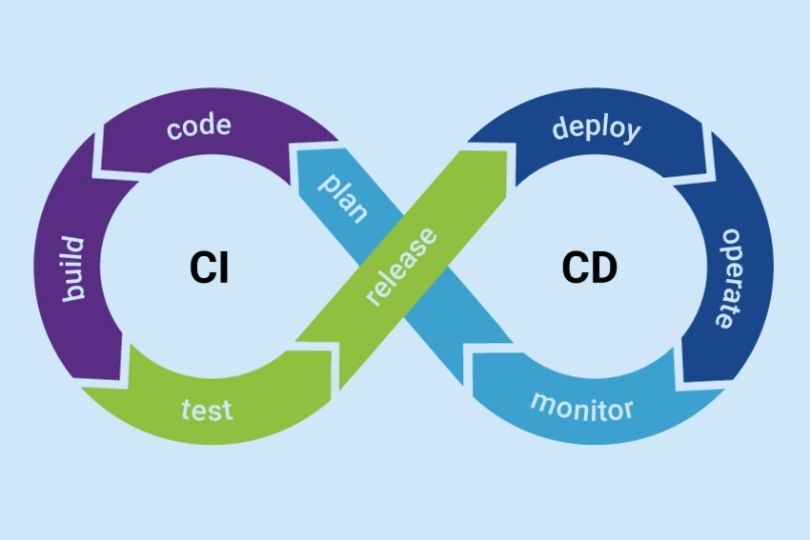
Building Resilient CI/CD Pipelines: Key Practices for Robust Development Continuous Integration (CI) and Continuous Delivery (CD) pipelines have become fundamental in modern software development. They help automate and streamline processes, from code commits to deployment. However, building resilient CI/CD pipelines goes beyond simple automation—it’s about ensuring that these pipelines can withstand changes, errors, and scale efficiently. In this blog, we’ll explore the importance of building resilient CI/CD pipelines, the best practices to achieve this resilience, and how to maintain these pipelines in the long term. What is a Resilient CI/CD Pipeline? A resilient CI/CD pipeline is one that is robust, reliable, and can gracefully handle failures or changes without disrupting the flow of the development lifecycle. In the context of CI/CD, resilience involves making sure that: Pipelines remain functional under load or when changes occur. Failures are detected early and mitigated efficiently. Automations are consistent and repeatable across different environments. Teams can quickly recover from issues, ensuring minimal downtime. Building resilience into your CI/CD pipeline ensures smoother deployments and accelerates the delivery of high-quality software. Key Components of a Resilient CI/CD Pipeline Before diving into the best practices, let’s briefly discuss the core components of a CI/CD pipeline: 1. Continuous Integration (CI) This is the practice of automatically integrating code changes into a shared repository multiple times a day. The goal is to detect errors early by running tests and validating the code continuously. 2. Continuous Delivery (CD) CD automates the delivery of applications to selected environments. It ensures that your software can be deployed to production at any time with confidence, but it doesn’t necessarily mean every change is deployed automatically. 3. Automation Automation in CI/CD is about making the build, test, and deployment processes as hands-off as possible. This includes automation of tasks like building code, running tests, and deploying to various environments. Best Practices for Building Resilient CI/CD Pipelines 1. Version Control for Pipelines The first step in creating a resilient CI/CD pipeline is to treat your pipelines like code. Just as you version your application code, you should version your pipeline definitions (e.g., in YAML or similar formats). Benefits: Ensures consistency across environments. Makes it easier to roll back to previous pipeline versions in case of issues. Enables easy collaboration and change management within teams. Actionable Tip: Use Git or GitHub Actions to manage and version control your pipeline configurations. 2. Automated Testing at Every Stage Automated testing is critical for ensuring that the code being integrated and delivered is of high quality. Implement tests in stages such as unit tests, integration tests, security tests, and acceptance tests. Benefits: Early Bug Detection: Automated tests help identify issues early in the process, saving time and effort. Consistency: Automated tests ensure that tests are run consistently every time the code changes. Actionable Tip: Incorporate Test-Driven Development (TDD) in your CI pipeline to continuously validate code as it’s written. 3. Failure Detection and Fast Feedback Loops A resilient pipeline should provide quick feedback to developers when things go wrong. Implementing failure detection and reporting tools such as Slack notifications, email alerts, or even status pages can speed up the debugging process. Benefits: Faster Response: DevOps teams can respond to failures faster when alerted instantly. Prevents Bottlenecks: Early failure detection prevents issues from propagating through the pipeline. Actionable Tip: Set up automated notifications to alert teams about build failures or integration issues, using services like Slack, PagerDuty, or Opsgenie. 4. Immutable Infrastructure for Scalability In resilient CI/CD pipelines, infrastructure should be immutable—that is, it should be replaced rather than modified over time. Using infrastructure as code (IaC) allows teams to define and provision infrastructure consistently. Benefits: Scalability: Immutable infrastructure scales easily because new environments are spun up with the same configuration as the old ones. Consistency: It eliminates configuration drift between environments, making deployments more predictable. Actionable Tip: Use Terraform or AWS CloudFormation to automate the deployment of immutable infrastructure. 5. Blue-Green and Canary Deployments One effective way to ensure smooth deployments is by using blue-green or canary deployment strategies. These methods allow you to test new code on a small subset of users before full production deployment. Benefits: Reduced Downtime: These deployment strategies reduce downtime and minimize the impact of potential issues. Easy Rollbacks: If something goes wrong, you can quickly roll back to the previous stable version. Actionable Tip: Implement Blue-Green or Canary deployment strategies in tools like Kubernetes or AWS Elastic Beanstalk. 6. Continuous Monitoring and Logging Monitoring and logging are key to ensuring resilience. Continuously monitor the health of your pipeline, infrastructure, and application. By logging all activities, including builds, tests, deployments, and incidents, you ensure that you have enough data to analyze failures and optimize the pipeline. Benefits: Proactive Issue Resolution: Continuous monitoring allows you to spot issues before they escalate. Visibility: Real-time logs provide transparency into the status of deployments, making it easier to troubleshoot. Actionable Tip: Use Prometheus, Grafana, or ELK Stack (Elasticsearch, Logstash, Kibana) for comprehensive monitoring and logging. 7. Incremental and Non-Disruptive Changes Instead of making large changes to your pipeline that can break multiple processes, break down changes into smaller, more manageable increments. This approach reduces risk and ensures that each change can be tested and validated quickly. Benefits: Less Disruption: Smaller changes are easier to test and roll back if necessary. Higher Quality: It’s easier to identify and address issues with smaller, incremental changes. Actionable Tip: Implement a feature toggle strategy to release new features incrementally and test them in production before fully enabling them for all users. 8. Implement Rollback Mechanisms Even with all the resilience built into your pipeline, mistakes happen. A resilient CI/CD pipeline should have rollback mechanisms in place that allow you to revert to a previous stable version quickly. Benefits: Reduced Downtime: Quickly roll back to a previous stable state in case of failure. Minimal Impact: Ensures users are not impacted during outages or disruptions. Actionable Tip: Use Kubernetes for deploying and rolling back applications, or configure AWS CodeDeploy for automatic rollback on

SRE

The Role of AI and Machine Learning in SRE: Revolutionizing Reliability and Efficiency

The Role of AI and Machine Learning in SRE: Revolutionizing Reliability and Efficiency Site Reliability Engineering (SRE) has long been recognized as a critical discipline in ensuring the availability, performance, and scalability of software systems. Traditionally, SRE practices focused on building reliable systems through proactive monitoring, incident response, and automation. However, with the rise of artificial intelligence (AI) and machine learning (ML), SRE is experiencing a transformation that is taking it to the next level. In this blog, we will explore the growing role of AI and ML in SRE, their benefits, and how you can integrate these technologies to improve your organization’s reliability and efficiency. What is SRE? Before diving into AI and ML in SRE, let’s quickly review what Site Reliability Engineering is. SRE is a discipline that incorporates aspects of software engineering and applies them to infrastructure and operations problems. Its goal is to create scalable and highly reliable software systems by focusing on the following: Availability: Ensuring systems are up and running as expected. Latency: Minimizing delays in response time. Performance: Optimizing systems for fast and efficient operations. Capacity: Managing resources effectively to support growth. Incident Management: Quickly detecting and resolving incidents to maintain service continuity. While the principles of SRE are well established, the integration of AI and ML is ushering in new methods of achieving these goals. How AI and Machine Learning are Impacting SRE 1. Automating Incident Detection and Response Traditionally, incident management involved manually monitoring logs and metrics to identify issues. This process was both time-consuming and prone to human error. AI and ML, however, can significantly improve this aspect by automatically detecting anomalies and triggering responses based on predefined conditions. Benefits: Faster Incident Detection: Machine learning models can analyze large volumes of data in real-time, identifying patterns or anomalies that could signal potential incidents. These systems can even predict outages before they occur by recognizing trends that lead up to service disruptions. Automated Response: Once an anomaly is detected, AI systems can trigger automatic remediation actions, such as scaling infrastructure, restarting services, or adjusting configurations, all without human intervention. Actionable Tip: Implement AI-powered monitoring tools like Datadog or New Relic that use machine learning algorithms to detect anomalies and trigger automated responses in your systems. 2. Optimizing Resource Management and Scaling Managing resources efficiently is key to maintaining reliable systems, particularly in cloud environments where resource demands can fluctuate. AI and ML help SRE teams manage resource scaling by predicting workload spikes and adjusting resource allocation in real time. Benefits: Predictive Scaling: By analyzing historical data and identifying usage patterns, AI can predict periods of high demand and scale resources in advance, preventing overloading of systems and ensuring optimal performance. Cost Efficiency: Machine learning can also help optimize the allocation of resources, ensuring that systems use only the necessary amount of resources, thus reducing costs. Actionable Tip: Use machine learning models to predict traffic spikes and automatically scale your infrastructure using cloud-native tools like AWS Auto Scaling or Google Cloud AutoML. 3. Improving Service Reliability with Predictive Analytics AI and ML can enhance the reliability of services by predicting failures or disruptions before they occur. By analyzing vast amounts of data from system logs, performance metrics, and even external factors like weather or traffic, AI can forecast potential issues with greater accuracy. Benefits: Proactive Issue Resolution: Predictive analytics allows SRE teams to take preventative actions, such as applying patches, increasing resource allocation, or optimizing configurations, before problems impact end-users. Enhanced SLAs: AI-driven predictions enable better forecasting and SLA management by ensuring that service levels are maintained at all times. Actionable Tip: Implement predictive analytics tools like Google AI Platform or Splunk to anticipate system failures and take proactive measures to avoid service disruptions. 4. Enhanced Root Cause Analysis When incidents occur, root cause analysis (RCA) is critical to understanding the underlying issues and preventing recurrence. AI and ML can automate the RCA process by correlating vast amounts of data from multiple sources and identifying the cause of the problem. Benefits: Faster Resolution: AI can quickly sift through logs, metrics, and historical incident data to pinpoint the exact cause of an issue, saving valuable time during critical incidents. Improved Insights: By automating the RCA process, SRE teams can gain more detailed insights into system behavior, enabling them to fine-tune configurations and reduce future issues. Actionable Tip: Leverage machine learning-powered RCA tools like Moogsoft or BigPanda to streamline your troubleshooting process and enhance post-incident analysis. 5. Enhancing Monitoring with AI-Powered Insights Traditional monitoring systems often require manual configuration and tuning. AI and ML can enhance monitoring by providing deeper insights into system performance, helping SRE teams detect anomalies, optimize configurations, and better understand user behavior. Benefits: Intelligent Alerting: AI systems can prioritize alerts based on severity, reducing alert fatigue and ensuring that SRE teams focus on critical issues. Contextual Insights: AI-powered monitoring tools can correlate events across multiple systems, providing context around the root cause of an issue, which aids in faster decision-making. Actionable Tip: Adopt AI-enhanced monitoring platforms such as Prometheus with Kubernetes, Dynatrace, or PagerDuty, which provide contextual, machine-driven insights into your system’s performance. Best Practices for Integrating AI and Machine Learning in SRE 1. Start Small and Scale Gradually AI and ML can seem overwhelming, especially for organizations that are just beginning to explore their potential in SRE. Start by integrating simple AI/ML models to automate repetitive tasks, such as anomaly detection, and gradually expand as you become more comfortable with the technology. 2. Focus on Data Quality Machine learning models rely heavily on data quality. Ensure that your data is clean, accurate, and representative of real-world conditions to achieve the best results with AI-driven solutions. 3. Collaborate with Data Science Teams SRE teams should work closely with data scientists to develop and train machine learning models tailored to their specific systems and environments. Collaborative efforts ensure the models are built with the right data inputs and can address real-world SRE challenges. 4. Continuously Monitor AI Performance AI and

SRE

Tutorial on Creating Effective Dashboards: A Comprehensive Guide

Tutorial on Creating Effective Dashboards: A Comprehensive Guide Dashboards are essential tools for visualizing data and making informed decisions. Whether for business analysis, operations monitoring, or performance tracking, an effective dashboard presents key insights in an easy-to-understand format. But creating a dashboard that is both visually appealing and functional requires careful planning and design. In this tutorial, we’ll walk you through the process of creating an effective dashboard, from gathering the right data to choosing the best visualization tools. By the end, you’ll have actionable insights that can help you build dashboards that empower your team and drive better decisions. Why Dashboards Matter for Your Business Dashboards provide a centralized view of key metrics, making it easier for teams to monitor performance, identify trends, and respond to issues quickly. In a business setting, dashboards help: Monitor Performance: Track metrics such as sales, customer satisfaction, and production efficiency in real-time. Enable Quick Decision-Making: Visualize data so stakeholders can make informed decisions on the fly. Improve Communication: Share dashboards with team members to ensure alignment on performance and business goals. Identify Areas for Improvement: Spot inefficiencies and opportunities for growth using visualized data. Step-by-Step Guide to Creating an Effective Dashboard Step 1: Define Your Goals and Metrics Before diving into the design process, it’s crucial to clarify what you want to achieve with your dashboard. Ask yourself the following questions: Who is the dashboard for? Different audiences may require different information. A sales team might need sales data, while a marketing team might prioritize web traffic and lead generation. What key performance indicators (KPIs) do you need to track? Select metrics that align with your business objectives. What actionable insights do you want to gain from the dashboard? The goal is to display data that leads to meaningful decisions. Actionable Tip: Focus on the “need-to-know” metrics rather than overwhelming your audience with too much information. Keep it simple and relevant. Step 2: Choose the Right Data Sources Your dashboard will be only as good as the data it pulls from. Common data sources for business dashboards include: CRM Tools: Salesforce, HubSpot, and other CRM platforms can provide data on sales, customer interactions, and marketing performance. Analytics Tools: Google Analytics or Adobe Analytics for website and user behavior data. ERP Systems: For financial and operational data. Social Media Analytics: Platforms like Twitter Analytics or Facebook Insights can provide social media performance data. Internal Databases: Pull from company-specific data stores like SQL databases, Google Sheets, or cloud storage. Ensure that the data is accurate, up-to-date, and consistent. Integrating data from multiple sources can offer a more comprehensive view of your business. Actionable Tip: Use automated data integration tools (e.g., Zapier or Integromat) to streamline the data import process and minimize manual updates. Step 3: Choose the Right Visualization Tools The visualization tools you use can significantly impact how well your dashboard communicates insights. Some common tools for creating dashboards include: Tableau: Known for its powerful data visualization capabilities and interactive dashboards. Power BI: A Microsoft product that offers strong integration with other Microsoft tools and robust data modeling. Google Data Studio: Free tool with flexible data integration options, ideal for smaller businesses or teams. Looker: Used by companies seeking advanced data modeling and visualization, especially for big data. Excel or Google Sheets: For simple, static dashboards or quick prototypes. Each tool has its strengths and weaknesses. Consider your team’s familiarity with these tools, the complexity of your data, and your budget when selecting a dashboard platform. Actionable Tip: Start with a simple tool (like Google Data Studio or Power BI) if you’re new to dashboard design. You can always migrate to more sophisticated platforms as your needs grow. Step 4: Design for Usability and Simplicity A good dashboard presents data clearly, without overwhelming the user. Focus on these design principles: 1. Clean Layout Use grids to organize your dashboard and maintain a consistent structure. Place the most important metrics in the center or at the top, as users tend to focus on these areas first. 2. Limit the Number of Metrics Avoid clutter by limiting the number of metrics on your dashboard. A good rule of thumb is to display no more than five to seven key metrics at a time. 3. Use the Right Chart Types Line charts for trends over time. Bar charts for comparisons between categories. Pie charts for proportions (but use sparingly). Heat maps for identifying areas of high or low activity. 4. Interactive Elements Add filters or drill-down capabilities to allow users to explore the data further. For example, users should be able to click on a bar in a bar chart to see more details for that category. 5. Color and Contrast Use color to highlight important data points, but avoid overwhelming the user with too many colors. Stick to a simple color palette and use contrasting colors for high-priority metrics. Actionable Tip: Keep your dashboard as simple as possible—think of it as a quick overview rather than a deep dive into every detail. Step 5: Ensure Real-Time Data and Accessibility An effective dashboard is one that stays up-to-date with real-time data. Depending on your business’s needs, this may require setting up automatic updates for your data sources or integrating with APIs. Additionally, ensure your dashboard is accessible to all stakeholders: Mobile Compatibility: Many users need access to dashboards on-the-go, so make sure it’s optimized for mobile. Permissions: Provide different levels of access depending on the user’s role. For example, some people may only need read-only access, while others may need editing privileges. Actionable Tip: Set up regular checks to ensure your data integrations are working properly, and monitor for any disruptions in data flow. Step 6: Continuously Improve and Update the Dashboard Once your dashboard is live, it’s essential to monitor its performance and gather feedback from users. Some ways to gather feedback include: User Testing: Regularly test the dashboard with actual users to identify pain points or areas for improvement. Engagement Metrics: Track which sections

SRE

Integrating APM Tools into Your SRE Workflow: A Comprehensive Guide

Integrating APM Tools into Your SRE Workflow: A Comprehensive Guide As businesses scale their applications and adopt complex architectures, maintaining system reliability becomes increasingly challenging. Site Reliability Engineering (SRE) plays a pivotal role in ensuring systems remain robust, scalable, and performant. A crucial aspect of modern SRE practices is the integration of Application Performance Management (APM) tools into the workflow. In this blog, we will explore why integrating APM tools is essential for your SRE team, how to implement them effectively, and the best practices to get the most out of these tools. What is APM, and Why Does it Matter for SRE? Application Performance Management (APM) refers to the monitoring and managing of performance and availability of software applications. APM tools allow teams to monitor application health, detect issues, and gain deeper visibility into system performance. For SRE teams, APM tools are critical for optimizing reliability, reducing downtime, and enhancing user experience. Integrating APM tools into your SRE workflow provides several benefits: Faster Issue Detection: APM tools provide real-time monitoring and alerts, enabling SRE teams to detect and address performance bottlenecks quickly. Proactive Problem Resolution: By offering insights into application behavior, APM tools help SREs identify problems before they impact end users. Enhanced Collaboration: APM data promotes better collaboration between SREs, developers, and other stakeholders, ensuring everyone is aligned on the root cause of issues. Improved Reliability: Continuous performance monitoring allows SRE teams to optimize systems for better uptime and resilience. Key Considerations When Integrating APM Tools into Your SRE Workflow 1. Choose the Right APM Tool for Your Needs There is a wide range of APM tools available today, each with its unique features. The first step in integration is selecting the tool that best fits your organization’s requirements. Some of the top APM tools for SRE teams include: New Relic: Offers end-to-end monitoring, detailed application performance metrics, and an intuitive dashboard for quick insights. Datadog: Provides cloud-based APM with deep visibility into distributed systems and infrastructure monitoring. AppDynamics: Known for its real-time performance monitoring and ability to trace transactions across microservices architectures. Dynatrace: Offers full-stack monitoring, AI-powered insights, and automated root cause analysis. Actionable Takeaway: Evaluate your application’s specific needs—whether it’s microservices monitoring, cloud infrastructure integration, or transaction tracing—and choose an APM tool that can scale with your organization’s growth. 2. Integrating APM with Your SRE Tools To ensure smooth and effective integration, your APM tool should seamlessly work with the existing tools in your SRE workflow. Common integrations include: Incident Management Tools: Integrate your APM tool with incident management platforms like PagerDuty or Opsgenie. This ensures alerts are automatically triggered when performance thresholds are crossed. Monitoring & Logging Systems: Combine APM data with your monitoring and logging systems, such as Prometheus, Grafana, or ELK Stack, to gain a holistic view of both application and infrastructure performance. Version Control and CI/CD Pipelines: APM tools can be integrated with version control systems like GitHub or GitLab and CI/CD platforms like Jenkins to track performance across deployments. Actionable Takeaway: Set up these integrations to create a centralized view of your application’s health and streamline the workflow for incident detection and resolution. 3. Define Clear SLOs and SLIs Using APM Data Site Reliability Engineering relies heavily on Service Level Objectives (SLOs) and Service Level Indicators (SLIs) to measure performance. APM tools provide the data necessary to define and track these metrics effectively. SLIs (Service Level Indicators) are measurable metrics that represent the reliability of your service. Common SLIs include error rates, latency, and throughput. SLOs (Service Level Objectives) are the goals set for these SLIs, e.g., 99.9% of transactions must complete within 200 milliseconds. By integrating APM tools with your SLO framework, you can ensure that the performance metrics you monitor align with the goals of your SRE team. APM tools like Datadog and New Relic provide built-in SLO/SLA (Service Level Agreement) tracking, which can help you measure and meet these objectives. Actionable Takeaway: Use your APM tool’s reporting features to define realistic SLIs and SLOs based on historical performance data. Regularly assess these metrics to ensure your service is meeting reliability goals. 4. Leverage APM for Root Cause Analysis and Incident Response When performance issues occur, APM tools provide valuable insights that help SRE teams pinpoint the root cause of incidents. By tracing requests and transactions across your systems, APM tools enable you to understand where bottlenecks or failures occur. Here’s how APM can help in incident response: Transaction Tracing: APM tools can track user transactions from end to end, identifying where latency or failures occur within microservices or databases. Real-Time Dashboards: Visualize key metrics such as response times, error rates, and system load in real-time, allowing for quicker detection and resolution. Automated Alerts: Set up customized alerts based on thresholds for key performance indicators (KPIs). These alerts can be linked to incident management platforms, ensuring that the appropriate teams are notified immediately. Actionable Takeaway: Create automated dashboards for your SRE team that display real-time performance metrics. Set alerts for critical thresholds to improve incident response times. 5. Optimizing Cost and Performance with APM Insights While APM tools provide detailed insights into performance, they can also help optimize operational costs. By monitoring resource utilization and application performance, SREs can identify underused or over-provisioned resources, enabling cost optimization. APM tools allow you to: Monitor Resource Usage: Track resource consumption (CPU, memory, bandwidth) to identify inefficiencies. Analyze Performance Bottlenecks: Identify inefficient code paths, misconfigured servers, or underperforming databases that are contributing to high costs. Actionable Takeaway: Use your APM tool’s analytics capabilities to identify areas where your system’s performance can be improved or optimized for cost efficiency. This proactive approach can help you avoid unnecessary overhead and improve system scalability. Best Practices for Integrating APM into Your SRE Workflow 1. Start with a Clear Plan Before implementing APM tools, it’s crucial to define your monitoring goals. What are you trying to achieve with APM integration? Whether it’s incident resolution, system optimization, or cost management, a clear plan will ensure your

    This will close in 0 seconds